
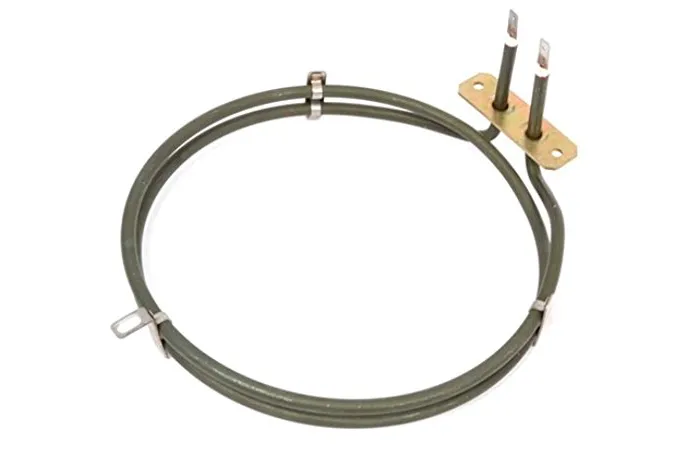
If your oven light comes on and the fan turns but the oven stays cold – or takes ages to warm up – the most common cause is a failed fan oven element. This is the round, coiled element behind the fan cover at the back of the oven.
Signs the fan oven element has failed
- The fan runs but the oven doesn’t heat on the fan setting
- The top or bottom elements still work on conventional settings, but fan cooking doesn’t
- The house electrics trip when you switch the oven on (the element may have shorted)
- The element looks blistered, broken or burnt through
If nothing heats on any setting, the problem may be the thermostat, a thermal cut-out or the control board instead – those are worth checking before buying a part.
Safety first
Switch the oven off at the isolator switch before you start. Replacing an element means removing the back panel and fan cover. If you’re not confident working on electrical appliances, use a qualified engineer.
How to find the right replacement
- Check the oven model number – usually on a label around the door frame.
- Check the wattage – most fan oven elements are 1800W, 2000W, 2100W, 2400W or 2500W.
- Check the size and fixings – the number of coil turns, the bracket and the terminal tags must match your old element.
- Use the part number if you have one, for example ELE9349 or C00084399.
Fan oven elements we stock
- Whirlpool fan oven elements – including the AKP, AKZ and AKL ranges
- Beko fan oven elements – 1800W elements for Beko, Blomberg, Flavel and Leisure
- Bosch, Neff, Siemens, Zanussi, Hotpoint and more in our oven elements range
- A universal 2000W fan oven element that fits many electric fan ovens
Not sure which element fits? Email us your oven model number and we’ll check for you. Fast tracked UK delivery.